Skip to content
← All blueprints
Client Onboard

Freelancer onboarding

Client Onboard

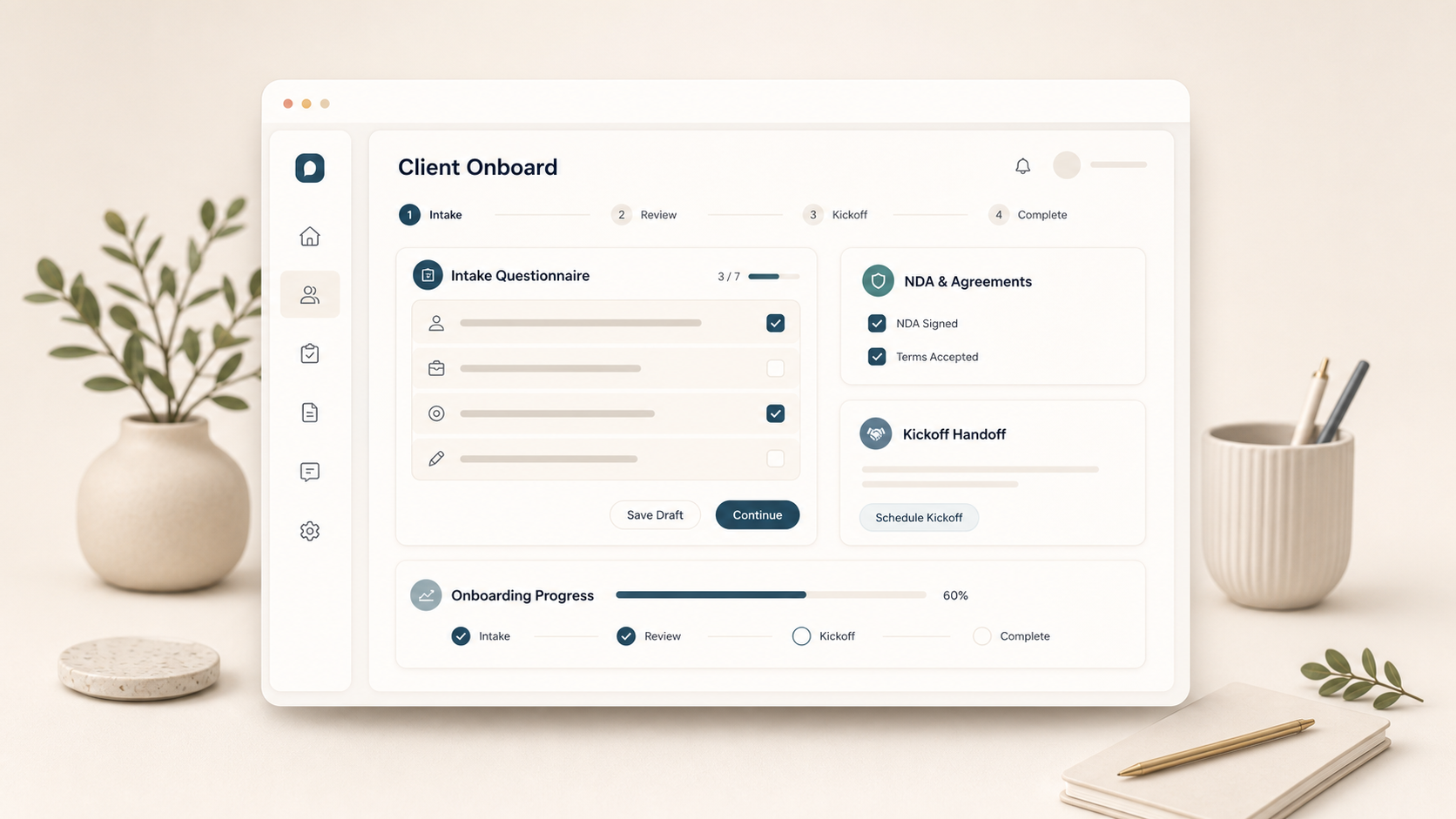
A polished client onboarding link for freelancers: intake, questionnaire, NDA checklist, and kickoff handoff in one place.

  • Full planning bundle — BRAND, MRD, BRD, PRD, DESIGN
  • Branded styleguide — typography, color, components
  • 4 previewable mockups

Cloning copies the full plan into a new project you own — edit it freely.

Inside the bundle

Styleguide and mockups

A look at the brand palette and screen-level mockups that ship with this plan. Cloning copies all of them into your project.

Style guide

Styleguide

What this blueprint gives you

Pre-built onboarding forms for freelancers: brand questionnaire, intake, NDA checklist, kickoff scheduler, submissions, and a welcome page in one client-safe link.

Why this one is simple enough to ship cleanly

The product has one narrow job, four obvious screens, no regulated data, no complex marketplace dynamics, and no heavyweight integration burden. It is a good candidate for the blueprint catalog because a buyer can understand the surface area in one minute.

Included planning files

BRAND, MRD, BRD, PRD, and DESIGN define the voice, market, business model, product scope, and visual system. The mockups include a styleguide plus four product screens that follow the marketplace design guidelines.

Planning documents

Preview the plan

Each blueprint includes the senior-level planning files. These cards show the opening text before you clone the full bundle.

Brand Guidelines Document

BRAND.md

Preview

BRAND — Client Onboard One line A polished client onboarding link for freelancers: intake, questionnaire, NDA checklist, and kickoff handoff in one place. Who it speaks to Freelancers and small agencies that need every new client to start with the same clean intake instead of scattered emails and docs. The buyer wants a focused tool that feels finished in five minutes, earns trust through precision, and avoids the enterprise dashboard smell that usually surrounds small operational problems. Voic

Design Specification Document

DESIGN.md

Preview

DESIGN — Client Onboard Information architecture A compact top navigation app with four primary destinations matching the mockup set. The working surface is always the first screen; secondary configuration and history sit one click away. Visual direction freelancer pro with client facing form polish, quiet admin tables, and warm trust cues. Color tokens Background: F6F2EA Secondary background: E8DFD0 Ink: 1F211A Muted: 626457 Line: D3C7B5 Accent: 4F6255 Accent soft: E0E9E3 Accent deep: 2E4436 Co

Market Requirements Document

MRD.md

Preview

MRD — Client Onboard Market summary Client Onboard is a one job micro SaaS pulled from the blueprint idea backlog (Idea 155, docs/blueprint ideas/02 micro saas.md). The market is not won by feature volume; it is won by becoming the fastest reliable place to solve a recurring tiny problem. The current alternatives are spreadsheets, browser bookmarks, generic note documents, and overbuilt suites. Those tools work until a user needs repeatability, shared defaults, or confidence that the output is c

Business Requirements Document

BRD.md

Preview

BRD — Client Onboard Business model Subscription for freelancers with paid template packs, branded portals, team seats for small studios, and lightweight form analytics. Pricing Free: core tool, limited history, public examples, and manual copy/export. Pro: saved history, private records, templates, branded share links, and export. Team: shared templates, rule management, audit trail, and admin controls. Revenue assumptions Solo conversion is driven by repeated use, not a hard paywall. Team conv

Product Requirements Document

PRD.md

Preview

PRD — Client Onboard Product summary Pre built onboarding forms for freelancers: brand questionnaire, intake, NDA checklist, kickoff scheduler, submissions, and a welcome page in one client safe link. Core screens Template Picker. Template picker: Brand sprint onboarding. Pre built project templates; Required document checklist; Estimated client time. Live Form. Client intake form: Tell us about the launch. Progress sections; Autosaved answers; Client safe helper copy. Submissions. Submission in

Keyboard shortcuts

Press ? anywhere to open this list. Esc closes it.

Go to dashboard
g d
Go to current project
g p
Save the editor
S
Send chat message
Open this cheat sheet
?

Sequence shortcuts (g _) only fire when no field is focused. On macOS use ; on other platforms Ctrl.