Skip to content
← All blueprints
Merch Drop

Creator Print-on-Demand Store

Merch Drop

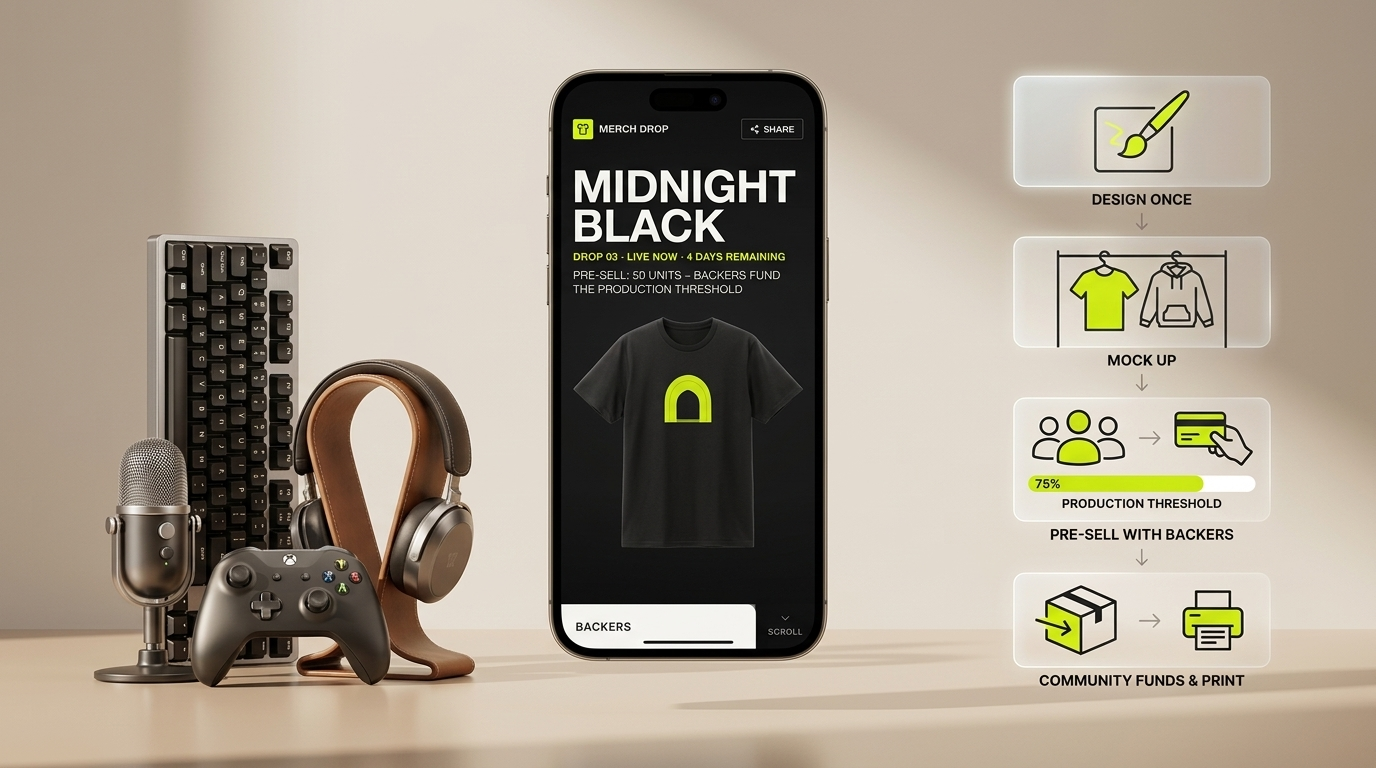
Design once, mock up on tees and hoodies, pre-sell with a production threshold — your community funds each drop before you print a single shirt.

  • Full planning bundle — BRAND, MRD, BRD, PRD, DESIGN
  • Branded styleguide — typography, color, components
  • 5 previewable mockups

Cloning copies the full plan into a new project you own — edit it freely.

Inside the bundle

Styleguide and mockups

A look at the brand palette and screen-level mockups that ship with this plan. Cloning copies all of them into your project.

Style guide

Styleguide

What this blueprint gives you

The complete drop-model storefront for independent creators. You design a graphic, see it mocked up on tees, hoodies, and posters in a built-in studio, set a pre-order target, and let your audience fund the run. Production only unlocks when you hit the number — so you never overstock, never lose money on a slow drop, and your community feels the energy of watching the counter climb.

The drop page — your storefront’s moment

Every drop gets an edge-to-edge lookbook page: full-bleed mockup photography, oversized title type, a live pre-order counter, and a countdown. The page looks like a streetwear release, not a generic e-commerce listing. Fans share it because it looks worth sharing — the design does the marketing.

Mockup studio — see it before you sell it

The built-in mockup studio places your artwork on flat-lay and on-figure product photos without any outside subscription. Choose the product (unisex tee, pullover hoodie, matte poster), pick a colorway, position your graphic, and export a print-ready production file in the same flow. What you sell is exactly what gets printed.

Pre-order tracker — community energy as a conversion tool

The threshold tracker is visible on the drop page. Fans see a fill bar, a backer count, and the number of units still needed to unlock production. You set the minimum — say 40 shirts — and when the bar fills, the drop locks, payments capture, and fulfillment queues automatically. Below threshold, no one is charged.

Fulfillment pipeline — from locked drop to shipped order

Once a drop clears its threshold, the blueprint routes the order to your print partner, attaches size breakdowns and print-ready artwork, tracks production status, and pushes shipping notifications with carrier links. You see every order’s state on a single screen — queued, printing, shipped, delivered, or flagged.

Creator earnings — every drop, every dollar

A clean earnings page shows gross revenue per drop, the platform and payment processing fees deducted, and the net payout timeline. Historical drops stack below so you can see which designs your audience actually buys. Repeat what works.

Designed for the streetwear release format

The visual system is high-contrast black and white with a single neon drop accent. Oversized type, edge-to-edge mockup imagery, and tight negative space. The product looks like a Supreme drop page or an independent label’s Shopify store — not a generic merch site. Customers spend more when the brand feels real.

Planning documents

Preview the plan

Each blueprint includes the senior-level planning files. These cards show the opening text before you clone the full bundle.

Brand Guidelines Document

BRAND.md

Preview

BRAND — Merch Drop One line Design once. The community unlocks the run. Who it speaks to The working independent creator — musician, illustrator, tattoo artist, YouTuber, Substack writer, street photographer — who has somewhere between 2,000 and 200,000 followers and has been asked "where can I buy a shirt?" more than once this year. They are not a fashion brand. They are not a company. They are a person with an audience, a visual identity they've built over years, and no idea how to get 300 tee

Design Specification Document

DESIGN.md

Preview

DESIGN — Merch Drop Visual direction Streetwear lookbook. Oversized editorial typography at sizes that feel almost transgressive for a product page — this is the intentional move. Edge to edge mockup photography. Extreme contrast: near black ink ( 0E0E0E) on near white paper ( F5F4F0), with a single creator specified accent color as the only chromatic element on the page. No gradients in the UI chrome. No card shadows softening the edges. The product image occupies the full visual weight; the in

Market Requirements Document

MRD.md

Preview

MRD — Merch Drop Market summary Print on demand has become the default merch channel for independent creators — the combination of no inventory risk and global fulfillment means any creator with an audience can theoretically sell branded products. The market is large and growing: Printful alone processes tens of millions of orders annually, and the creator economy broadly generates an estimated $250B in revenue with merchandise as a consistent secondary income stream after subscriptions and bran

Business Requirements Document

BRD.md

Preview

BRD — Merch Drop Business model Revenue comes from two sources: a platform fee taken from each locked drop, and an optional premium tier for creators who want custom domains and advanced analytics. 1. Per drop platform fee. When a drop locks and payments capture, the platform retains 8% of gross revenue before passing earnings to the creator. This fee is shown to the creator during drop setup — they price their item knowing what they net. No monthly subscription required for basic drops. 2. Crea

Product Requirements Document

PRD.md

Preview

PRD — Merch Drop Product summary A drop format print on demand storefront for independent creators. The creator designs artwork, previews it on products in a built in mockup studio, sets a pre order threshold, and publishes a drop page. Backers pre order; when the threshold is met, the drop locks, payments capture, production queues, and the creator earns. If the threshold is not met by the close date, payments are not captured and the drop expires cleanly. Personas Jordan, the illustrator with

Keyboard shortcuts

Press ? anywhere to open this list. Esc closes it.

Go to dashboard
g d
Go to current project
g p
Save the editor
S
Send chat message
Open this cheat sheet
?

Sequence shortcuts (g _) only fire when no field is focused. On macOS use ; on other platforms Ctrl.